Hi.
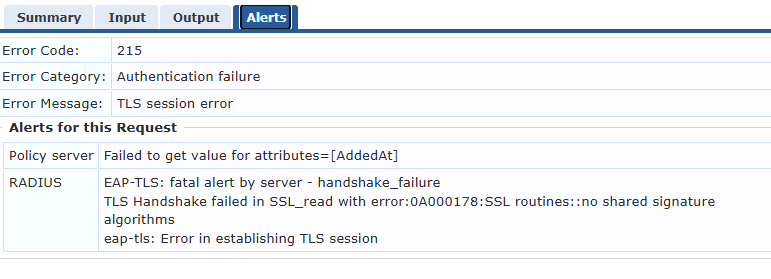
Yes 6.14.x removed sha-1 signature algorithms among others so from here you get error "no shared signature".
Unfortunately no certificate manipulation will solve unsupported signature algorithms.
Original Message:
Sent: Nov 05, 2026 07:26 AM
From: SD-4f8dac
Subject: AP uplink 802.1x EAP-TLS issue with Clearpass 6.14.1
i've been playing around with this in my lab and tested AP-615 on 10.7 and 10.8 against CPPM 6.14.1.
It seems the 10.7 AP only sends SHA-1 method in handshake so CPPM is rejecting.
10.8 sends SHA-256
Extension: signature_algorithms
Signature Hash Algorithms (1 algorithm)
Signature Algorithm: rsa_pkcs1_sha1 (0x0201)
Extension: signature_algorithms
Signature Hash Algorithms (1 algorithm)
Signature Algorithm: rsa_pkcs1_sha256 (0x0401)
maybe clearpass isn't accepting the sha1 algorithm even with the rootca enabled?
Original Message:
Sent: Nov 04, 2026 01:24 PM
From: DA-Gkh357
Subject: AP uplink 802.1x EAP-TLS issue with Clearpass 6.14.1
Thanks very much again - will await feedback from the TAC folks and look to update on any information/details we receive.
Thanks very much again,
Original Message:
Sent: Nov 04, 2026 01:12 PM
From: GK-c34688
Subject: AP uplink 802.1x EAP-TLS issue with Clearpass 6.14.1
Don't forget that this is no longer problem with certificates as 6.14.1 resolve it. As EF pointed out, it is problem with algorithm negotiation as AP only offer old rsa_pkcs1_sha1 instead of something that is available on Clearpass 6.14.
Hope it helps to narrow down solution.
Best, Gorazd
------------------------------
Gorazd Kikelj
MVP Guru 2025
------------------------------
Original Message:
Sent: Nov 04, 2026 01:01 PM
From: DA-Gkh357
Subject: AP uplink 802.1x EAP-TLS issue with Clearpass 6.14.1
Thanks - yeah, hoping for an update soon for sure.
We were focused on these sections, as it relates to 6.14.1;
Aruba AP 802.1X EAP-TLS with an SHA-1 root certificate is now supported in non-FIPS mode. As part of this fix, from ClearPass 6.14.1 onwards, during a backup-and-restore operation SHA‑1 root certificates that were imported to the Trust List are retained in non-FIPS mode. For more information, see CP‑60839.
Our understanding was that, at least the 500 series, utilized TPM 2.0
Thanks again
Original Message:
Sent: Nov 04, 2026 12:43 PM
From: GK-c34688
Subject: AP uplink 802.1x EAP-TLS issue with Clearpass 6.14.1
Great that we have a TAC Clearpass and AP team working on it. I beleive that this is relevant part from 6.14.0 release notes that are biting us now:
| ClearPass 6.14 does not support the following cryptographic algorithms and ciphers. As part of this change, when a system is upgraded to 6.14, if its configuration database includes certificates with the SHA‑1 signature algorithm, then the upgrade is blocked and a warning message is displayed. Deprecated certificates that are not enabled are deleted after user verification. For more information, see CP‑55730. (CP‑55730, CP‑56172, CP‑56030) |
| - | SHA-1 signature algorithm in digital signatures and certificates |
| - | 3DES and RC4 encryption algorithms |
| - | RSA and Diffie-Hellman parameters less than 2048 bits |
------------------------------
Gorazd Kikelj
MVP Guru 2025
------------------------------
Original Message:
Sent: Nov 04, 2026 12:34 PM
From: DA-Gkh357
Subject: AP uplink 802.1x EAP-TLS issue with Clearpass 6.14.1
Thanks for the update and details - yeah, we are certainly in a bad spot here for sure on it. We had opened a case with TAC and the ClearPass folks and they opened a parallel case with the AP folks and we are awaiting updates from that side. Not sure which will be the fix from our side - we are currently doing MAC auth to get the AP's online, but it does mean a full change on the switches, etc. to support - I have my fingers crossed for some better news from TAC. Again, thanks for the testing and details provided.
Original Message:
Sent: Nov 04, 2026 12:28 PM
From: GK-c34688
Subject: AP uplink 802.1x EAP-TLS issue with Clearpass 6.14.1
Currently it is looking that you are out of luck with 6.14.1. By removing old cyphers ap is unable to negotiate signature algorithm for comunication. It is strange that even latest fw version on some AP models (even newer ones) does not support at least one common algorithm.
Currently even custom cert is not working as cert exchsngd never happend.
If therd would be a way to enable required key exchange algorithm, then we would be able to make it work. As for now the only "quick" way is to replace affected APs.
If you didn't already done yet, l would open TAC case on Clearpass and AP to start the process.
Don't know what would best solution be. Most secure one would be new AP fw that suport minimal key algoritm now required in 6.14 clearpass.
Best, Gorazd
------------------------------
Gorazd Kikelj
MVP Guru 2025
------------------------------
Original Message:
Sent: Nov 04, 2026 09:43 AM
From: DA-Gkh357
Subject: AP uplink 802.1x EAP-TLS issue with Clearpass 6.14.1
Thanks all for the testing and details. Still urgent on our side, as we have moved to 6.14.1 with the understanding we would still be able to secure the AP uplink with EAP-TLS based on our devices and the release notes.
Original Message:
Sent: Nov 04, 2026 04:02 AM
From: GK-c34688
Subject: AP uplink 802.1x EAP-TLS issue with Clearpass 6.14.1
Hi Christian.
I'm almost sure to be the case. I was also tested with custom certificate that was working fine under 6.11 and 6.12 and it fail under 6.14.1.
Will try to test it.
Best, Gorazd
------------------------------
Gorazd Kikelj
MVP Guru 2025
------------------------------
Original Message:
Sent: Nov 04, 2026 03:42 AM
From: CC-61858c
Subject: AP uplink 802.1x EAP-TLS issue with Clearpass 6.14.1
Problem is now a little less urgent as HPE has released a PHP Hotfix for version 6.12.8
@Gorazd: Do you mean that the NAC is still failing with controller AOS 8.13.3.1 ?
Kind regards
Christian Chautems
Original Message:
Sent: Nov 04, 2026 03:26 AM
From: GK-c34688
Subject: AP uplink 802.1x EAP-TLS issue with Clearpass 6.14.1
Same result with 8.13.3.1.
Best, Gorazd
------------------------------
Gorazd Kikelj
MVP Guru 2025
------------------------------
Original Message:
Sent: Nov 04, 2026 02:55 AM
From: GK-c34688
Subject: AP uplink 802.1x EAP-TLS issue with Clearpass 6.14.1
Tested with 10.8.1.2 on AP-315. Same result.
------------------------------
Gorazd Kikelj
MVP Guru 2025
------------------------------
Original Message:
Sent: Nov 03, 2026 09:22 PM
From: DA-Gkh357
Subject: AP uplink 802.1x EAP-TLS issue with Clearpass 6.14.1
Sorry, yeah, we are full controller based AP for our setup - I think we are in the same spot as the original poster for setup, with very similar O/S versions on the units.
Thanks again,
Original Message:
Sent: Nov 03, 2026 08:59 PM
From: AP-e172d8
Subject: AP uplink 802.1x EAP-TLS issue with Clearpass 6.14.1
oh so you are running controller based AP deployment!
the 8.13.3.1 that tested with was an Instant AP not a controller based AP.
------------------------------
If my post was useful accept solution and/or give kudos.
Any opinions expressed here are solely my own and not necessarily that of HPE or Aruba.
------------------------------
Original Message:
Sent: Nov 03, 2026 07:31 PM
From: DA-Gkh357
Subject: AP uplink 802.1x EAP-TLS issue with Clearpass 6.14.1
Thank you so much for the testing and update on this.
We have adjusted our settings here to test and still running into the same issue - we are running 8.10.0.20 LSR, thus I wonder if we have to throw caution to the wind and update to 8.13.3.1 on the controllers to match the above testing.
Original Message:
Sent: Nov 03, 2026 06:42 PM
From: AP-e172d8
Subject: AP uplink 802.1x EAP-TLS issue with Clearpass 6.14.1
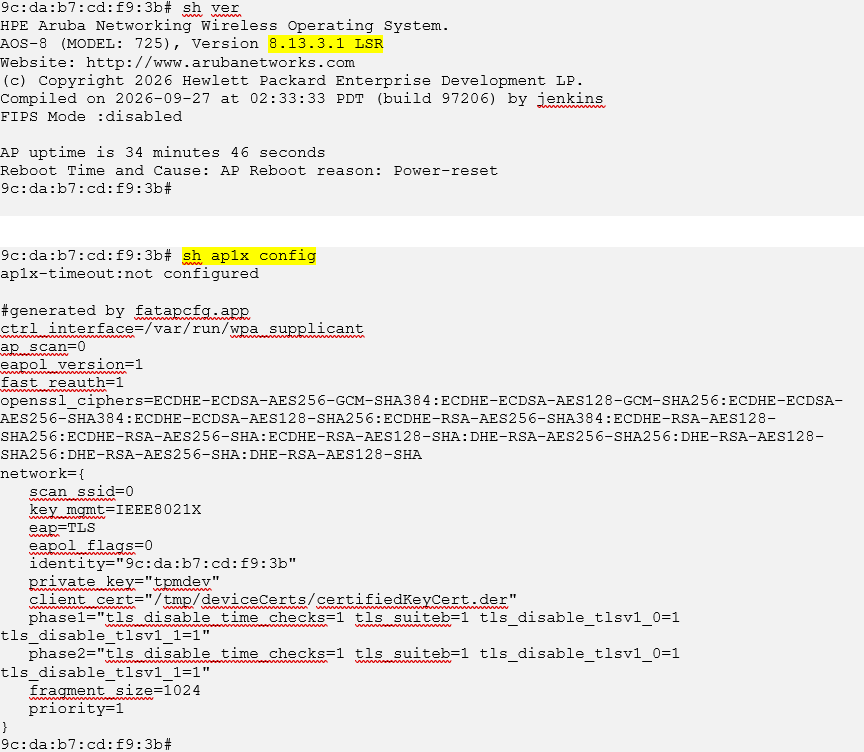
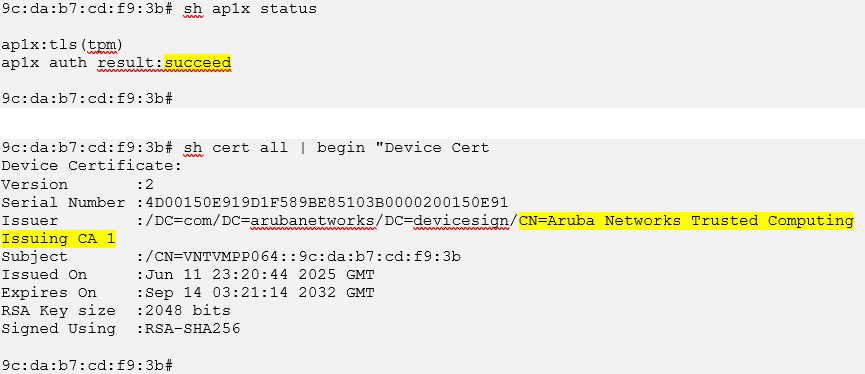
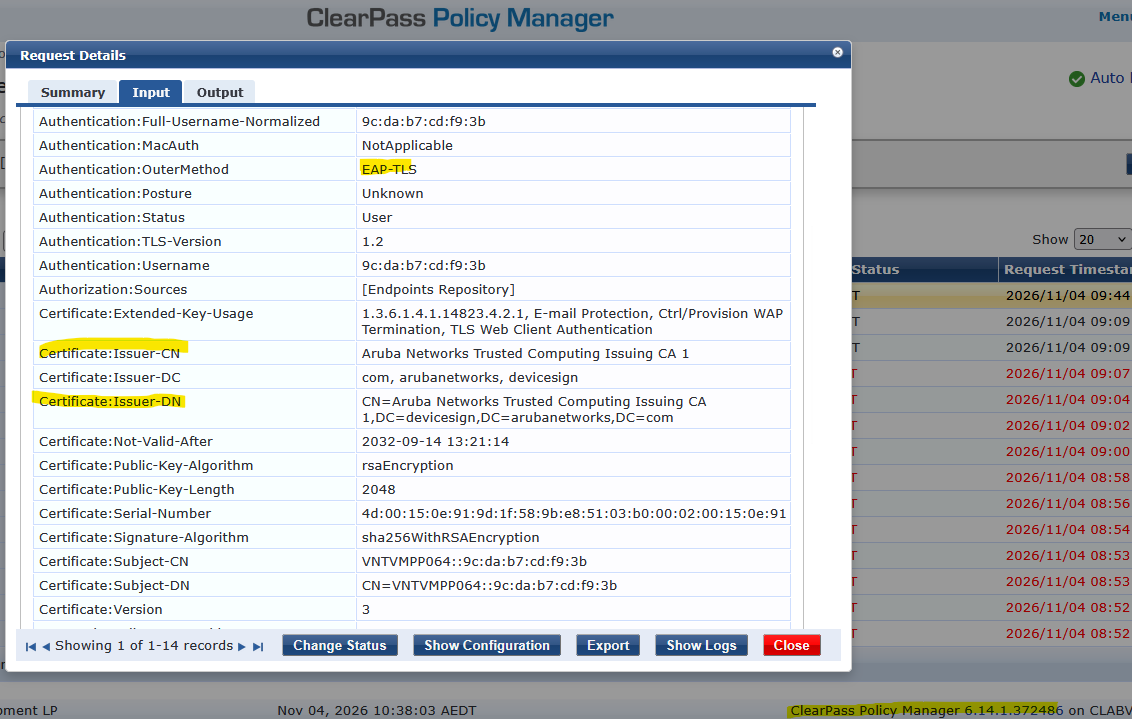
I just finished testing this for you with AP-725 (8.13.3.1) and ClearPass 6.14.1.372486 (with hotfix)
it worked fine as before when i tested it with AOS10.x see the screenshots
------------------------------
If my post was useful accept solution and/or give kudos.
Any opinions expressed here are solely my own and not necessarily that of HPE or Aruba.
------------------------------
Original Message:
Sent: Nov 03, 2026 05:40 PM
From: AP-e172d8
Subject: AP uplink 802.1x EAP-TLS issue with Clearpass 6.14.1
yes the usage for the other two were others, but i need to test it with AOS8.13.x to be comparable to your env.
· CN=Aruba Networks Trusted Computing Issuing CA 3 <<usage = other
· CN=Aruba Networks Trusted Computing Policy CA 2.0 <<usage = RadSec, other
S
regards
Ariya
------------------------------
If my post was useful accept solution and/or give kudos.
Any opinions expressed here are solely my own and not necessarily that of HPE or Aruba.
------------------------------
Original Message:
Sent: Nov 03, 2026 05:30 PM
From: DA-Gkh357
Subject: AP uplink 802.1x EAP-TLS issue with Clearpass 6.14.1
Thanks very much for the reply and details - for the two certificates;
- CN=Aruba Networks Trusted Computing Issuing CA 3
- CN=Aruba Networks Trusted Computing Policy CA 2.0
On your testing they are just enabled and the usage is just set as 'Other'?
I have confirmed the root on ours as noted also;

Thanks very much again,
Original Message:
Sent: Nov 03, 2026 05:24 PM
From: AP-e172d8
Subject: AP uplink 802.1x EAP-TLS issue with Clearpass 6.14.1
ok i tested the same AP-505 AOS10.8.1.2 with ClearPass 6.14.1 and got it to work. by enabling the following certificates
- CN=Aruba Networks Trusted Computing Issuing CA 3
- CN=Aruba Networks Trusted Computing Policy CA 2.0
- CN=Aruba Networks Trusted Computing Root CA 1.0 <<<<SHA1 signed
if for whatever reason, the usage of "CN=Aruba Networks Trusted Computing Root CA 1.0" is not as shown below, it will not allow you to enable it.
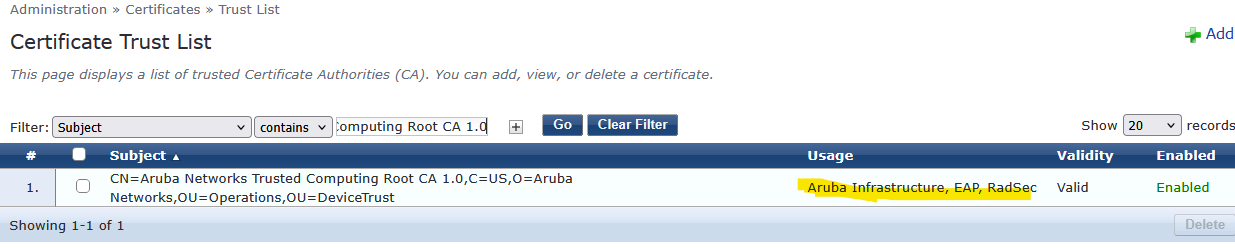
and here is the access tracker computed attributes.
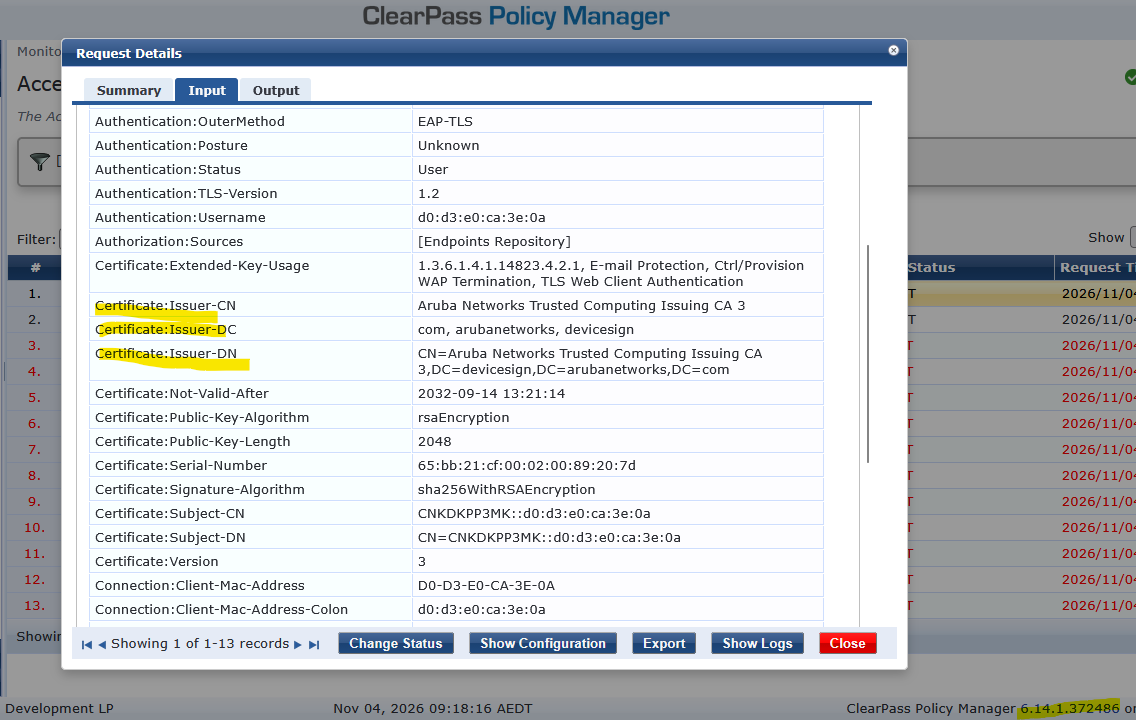
------------------------------
If my post was useful accept solution and/or give kudos.
Any opinions expressed here are solely my own and not necessarily that of HPE or Aruba.
------------------------------
Original Message:
Sent: Nov 03, 2026 11:26 AM
From: DA-Gkh357
Subject: AP uplink 802.1x EAP-TLS issue with Clearpass 6.14.1
Thanks all for the update and details - yeah, feel we are still stuck on this side - we enabled, with reviewing the AP;
CN=Aruba Networks Trusted Computing Issuing CA 2,DC=devicesign,DC=arubanetworks,DC=com
CN=Aruba Networks Trusted Computing Policy CA 2.0,OU=Operations,OU=DeviceTrust,O=Aruba Networks,C=US
along with the SHA1 Root CA, but still get the same error; TLS Handshake failed in SSL_read with error:0A000178:SSL routines::no shared signature algorithms and no details in the Access Tracker, as I think like above, it is not even negotiating on the certificate side.
Original Message:
Sent: Nov 03, 2026 04:49 AM
From: AP-e172d8
Subject: AP uplink 802.1x EAP-TLS issue with Clearpass 6.14.1
I also tested AP-505 with 10.8.1.2 and it worked fine with CP 6.11.16
I don't have AP-3xx as it is quite old.
Tomorrow when I get some time, I'll test the same AP-505 with my ClearPass 6.14.1
------------------------------
If my post was useful accept solution and/or give kudos.
Any opinions expressed here are solely my own and not necessarily that of HPE or Aruba.
------------------------------
Original Message:
Sent: Nov 03, 2026 03:41 AM
From: GK-c34688
Subject: AP uplink 802.1x EAP-TLS issue with Clearpass 6.14.1
Hi Ariyup.
Clearpass 6.11 and 6.12 are ok. But 6.14 removed old chyphers used by APs. And so those APs are now problematic.
I didn't test eith 8.13 but on 10.8.2.1 and AP315 it won't work any more.
Best, Gorazd
------------------------------
Gorazd Kikelj
MVP Guru 2025
------------------------------
Original Message:
Sent: Nov 03, 2026 02:47 AM
From: AP-e172d8
Subject: AP uplink 802.1x EAP-TLS issue with Clearpass 6.14.1
I just tested this in my setup and got it working with ClearPass 6.11.16 and AP-505 (AOS 10.7.2.2)
First I got a bunch of rejects and then checked the device cert
#sh cert all | begin "Device Cert"
Device Certificate:
Version :2
Serial Number :65BB21CF00020089207D
Issuer :/DC=com/DC=arubanetworks/DC=devicesign/CN=Aruba Networks Trusted Computing Issuing CA 3
Subject :/CN=CNKDKPP3MK::d0:d3:e0:ca:3e:0a
Issued On :May 27 16:37:18 2020 GMT
Expires On :Sep 14 03:21:14 2032 GMT
RSA Key size :2048 bits
Signed Using :RSA-SHA256
and enabled the chain, here are the CA certs that I enabled, and the last one was the SHA1 signed.
CN=Aruba Networks Trusted Computing Issuing CA 3
CN=Aruba Networks Trusted Computing Policy CA 2.0
CN=Aruba Networks Trusted Computing Root CA 1.0
if you want i can upgrade the AP-505 to 10.8.1.1 and test again.
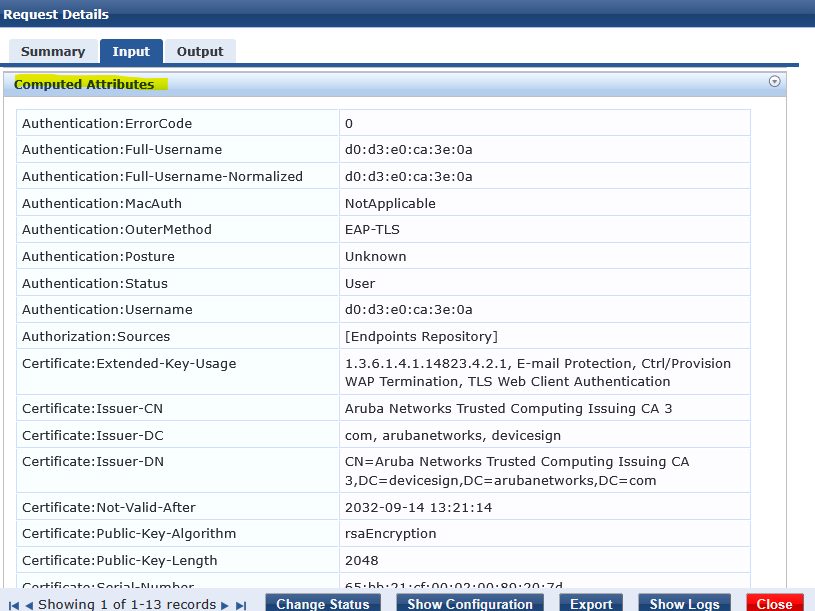
------------------------------
If my post was useful accept solution and/or give kudos.
Any opinions expressed here are solely my own and not necessarily that of HPE or Aruba.
------------------------------
Original Message:
Sent: Nov 02, 2026 09:45 AM
From: DA-Gkh357
Subject: AP uplink 802.1x EAP-TLS issue with Clearpass 6.14.1
Yeah, we are certainly seeing it with the small number of 300 series that we have, that were working before. But, we are also seeing it on all the 500 series ones we are running (515/525), with the same issues as noted by folks. We are running 8.10.0.20 LSR on the controllers for reference.
Thanks,
Original Message:
Sent: Nov 02, 2026 09:31 AM
From: GK-c34688
Subject: AP uplink 802.1x EAP-TLS issue with Clearpass 6.14.1
Yes. Very true. I came to the same conclusion. I have 10.8.1.1 on AP505H and AP315. And 315 has this problem with Clearpass 6.14.1. 505H is working just fine.
Best, Gorazd
------------------------------
Gorazd Kikelj
MVP Guru 2025
------------------------------
Original Message:
Sent: Nov 02, 2026 09:19 AM
From: EF-ffda94
Subject: AP uplink 802.1x EAP-TLS issue with Clearpass 6.14.1
This is not an issue with the trust chain. Yes, 6.14.1 re-enabled support for SHA1 root CAs and you just need to enable it. This is an issue with the AP firmware itself. I am running 8.10.0.23 with 655s and I am getting the same "no shared signature algorithms" error. This occurs because the ClientHello from the AP when establishing a TLS session only presents "rsa_pkcs1_sha1" and nothing else in the list of algorithms. with no Extended Master Secret (EMS). Because the only one offered is SHA-1, 6.14 denies it by sending the Access-Reject. The trust list never comes into play, as they never even get to exchanging certificates.
It appears that 8.10.0.x APs are running a pre-1.1 OpenSSL stack. AOS 8.13.2.0 upgraded the OpenSSL stack to 3.x. But I am not able to correlate if that is the fix or not. There is nothing in the release notes describing this problem.
It is frustrating because this is Aruba APs running an LSR attempting to do dot1X TLS auth to ClearPass running an LSR and it doesn't work. Something needs to change here.
Original Message:
Sent: Nov 02, 2026 03:04 AM
From: GK-c34688
Subject: AP uplink 802.1x EAP-TLS issue with Clearpass 6.14.1
Manage to reproduce the issue. Looks like it affect 3xx and older series. Chain is ok, but looks like some of the chippers are removed from 6.14 that are needed for those old APs.
I see the problem with 315. 505H is ok.
Best, Gorazd
------------------------------
Gorazd Kikelj
MVP Guru 2025
------------------------------
Original Message:
Sent: Oct 30, 2026 01:45 PM
From: DA-Gkh357
Subject: AP uplink 802.1x EAP-TLS issue with Clearpass 6.14.1
We are facing the same issue here - we were able to determine the following from the access point;
AP Factory Certificate
↓
Aruba Networks Trusted Computing Issuing CA 2
↓
Aruba Networks Trusted Computing Policy CA 2.0
↓
Aruba Networks Trusted Computing Root CA 1.0
We have enabled the Issuing and Policy, as they were not enabled - the Root was enabled again after moving to 6.14.1, but we have the same error as above;
TLS Handshake failed in SSL_read with error:0A000178:SSL routines::no shared signature algorithms
Any other areas we should be looking to get back to having EAP-TLS authentication for the access points?
Thanks very much,
Original Message:
Sent: Oct 29, 2026 02:08 AM
From: GK-c34688
Subject: AP uplink 802.1x EAP-TLS issue with Clearpass 6.14.1
And please check the whole cert trust chain. It can be different based on AP model or factory.
------------------------------
Gorazd Kikelj
MVP Guru 2025
------------------------------
Original Message:
Sent: Oct 29, 2026 02:04 AM
From: GK-c34688
Subject: AP uplink 802.1x EAP-TLS issue with Clearpass 6.14.1
From your post I think you missed Policy cert. You only enabled Root.
Best, Gorazd
------------------------------
Gorazd Kikelj
MVP Guru 2025
------------------------------
Original Message:
Sent: Oct 29, 2026 02:03 AM
From: GK-c34688
Subject: AP uplink 802.1x EAP-TLS issue with Clearpass 6.14.1
I did this yesterday and have no problems. I test this as soon as 6.14.1 was available.
Two certs need to be enabled. Ariyup did a great article on this.
Best, Gorazd
------------------------------
Gorazd Kikelj
MVP Guru 2025
------------------------------
Original Message:
Sent: Oct 29, 2026 01:58 AM
From: GK-c34688
Subject: AP uplink 802.1x EAP-TLS issue with Clearpass 6.14.1
Just enable Aruba SHA1 root and policy CA certificates. I hope you didn't delete them before upgrade.
It should work after that.
------------------------------
Gorazd Kikelj
MVP Guru 2025
------------------------------