Your RADIUS server certificate should be a PKI signed certificate, it can't be self-signed.
But the PKI that signed the RADIUS server cert can be a private CA, for example your cloud PKI (assuming it can sign server certs as well). Just make sure the root that signed the server cert is installed into the client certificate store, which is trivial with Intune.
Here are for reference my Intune configuration policies:
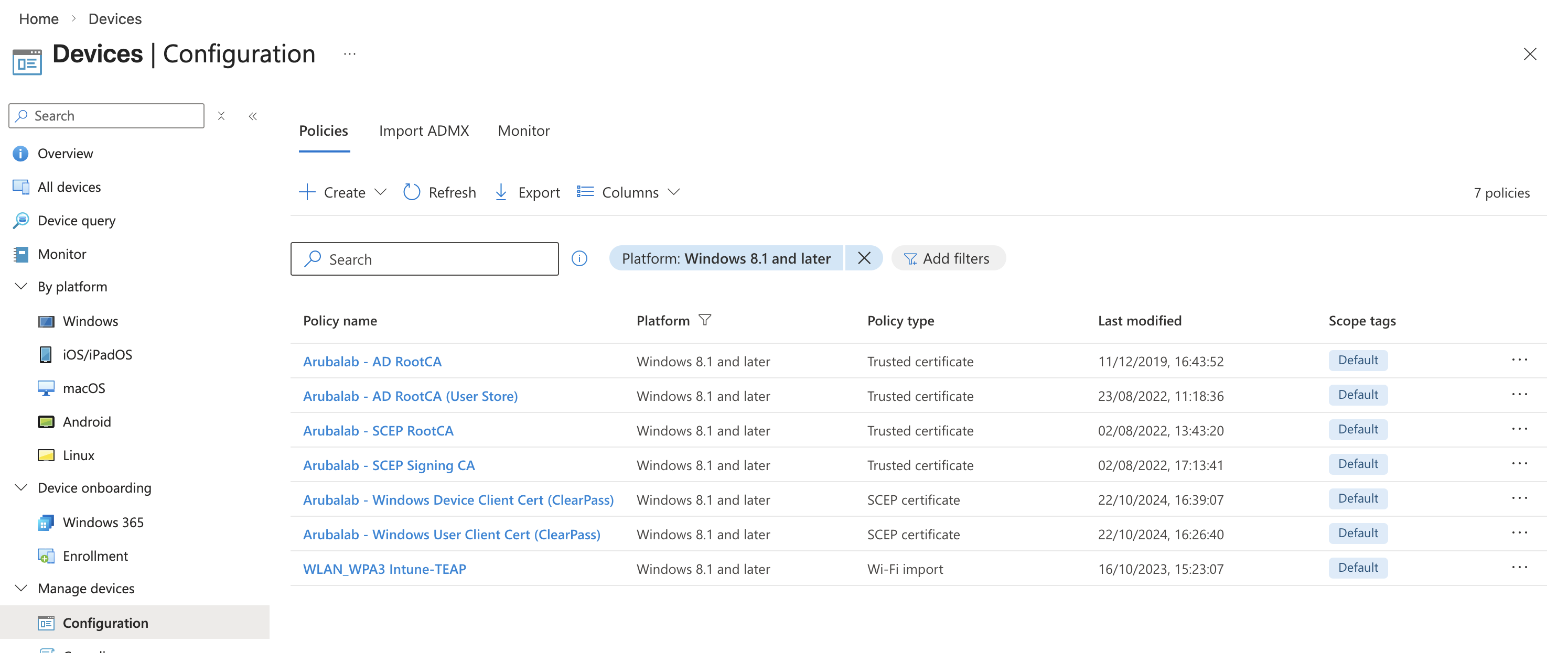
My server certificate is signed by the AD RootCA (a private CA, in my case running in the AD Domain).
This probably looks different with Microsoft's Cloud PKI, but I don't have access to that so can't comment further on that part; but idea remains the same: client should have the root CA that signed the server cert, needs to trust the SCEP server (may be the cloud PKI), needs to request certificate from the SCEP server for the computer and/or user, and the supplicant needs to be configured for wired or a WiFi SSID.
If you really have a self-signed server cert, my guess is that that's causing your problem.
------------------------------
Herman Robers
------------------------
If you have urgent issues, always contact your HPE Aruba Networking partner, distributor, or Aruba TAC Support. Check
https://www.arubanetworks.com/support-services/contact-support/ for how to contact HPE Aruba Networking TAC. Any opinions expressed here are solely my own and not necessarily that of Hewlett Packard Enterprise or HPE Aruba Networking.
In case your problem is solved, please invest the time to post a follow-up with the information on how you solved it. Others can benefit from that.
------------------------------
Original Message:
Sent: Mar 13, 2026 01:23 PM
From: Netbuzz
Subject: ClearPass 802.1X with Entra ID and Intune
Thank you for the response..
I am using cloud PKI (Intune) to allocate client certificates for the laptop along with root CA. root cert is also added to "trust list" and selected as EAP for usage. under "certificate store" we are using self-signed for radius/EAP service (this cert has been installed on windows client) along with clearpass server hostname..
Is this a correct setup?
Thanks again
------------------------------
[Akshay][Vishwas]
------------------------------
Original Message:
Sent: Mar 13, 2026 12:24 PM
From: Herman Robers
Subject: ClearPass 802.1X with Entra ID and Intune
It may be that the client is not properly configured to trust the RADIUS server certificate, either the Root CA or the server name. Or it may be that the client has multiple client certificates to choose from (or no certificate available), and either aborts or prompts the user what to do next.
------------------------------
Herman Robers
------------------------
If you have urgent issues, always contact your HPE Aruba Networking partner, distributor, or Aruba TAC Support. Check https://www.arubanetworks.com/support-services/contact-support/ for how to contact HPE Aruba Networking TAC. Any opinions expressed here are solely my own and not necessarily that of Hewlett Packard Enterprise or HPE Aruba Networking.
In case your problem is solved, please invest the time to post a follow-up with the information on how you solved it. Others can benefit from that.
Original Message:
Sent: Mar 13, 2026 10:57 AM
From: Netbuzz
Subject: ClearPass 802.1X with Entra ID and Intune
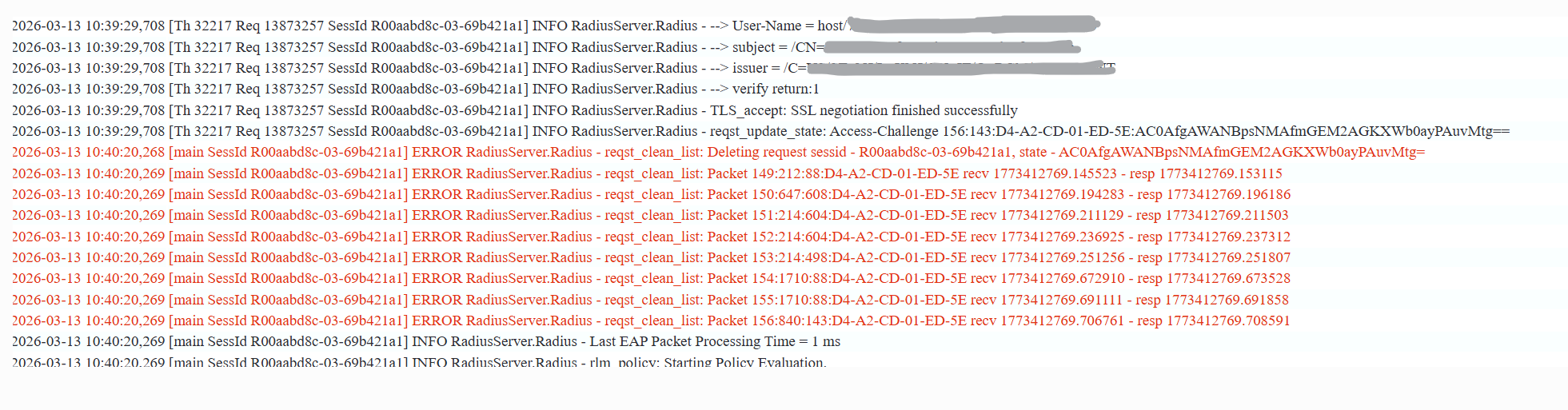
Thank you for the response I have tweaked MTU on CPPM so that server can negotiate. still the same issue for me. I have posted the screenshot which says TLS exchange was successful. Looks like CPPM is waiting for response from windows client and doesn't receive anything back hence terminating EAP TLS sessions.
Any thoughts here..?
------------------------------
[Akshay][Vishwas]
Original Message:
Sent: Mar 12, 2026 05:37 PM
From: ariyap
Subject: ClearPass 802.1X with Entra ID and Intune
this could be a MTU size issue cause by how large is the certificate chain.
------------------------------
If my post was useful accept solution and/or give kudos.
Any opinions expressed here are solely my own and not necessarily that of HPE or Aruba.