Controllerless Networks

 View Only
  • 1.  Enabling additional local dhcp scope

    Posted Apr 24, 2020 05:41 AM

    Hi,

    I'm sure this is a smple question .... moving gradually along from controllers assigned dhcp to  using centralised isc dhcp server 


    3 node instant cluster using 303H's 

    8.6.0.4 


    3 SSIDs all using default dhcp local scope ... stuff works and users get assigned ip address on 172.31.98.0/23 and NAT'd out to rest of net/world


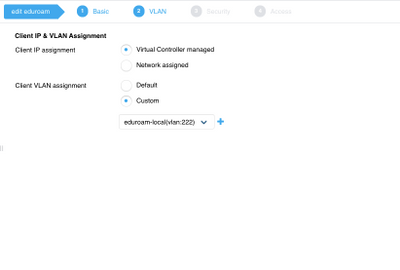
    Create another local scope using vlan 222 and  ip 172.32.222.0/24


    Assign to 1 of the SSIDs ..... no addresses assigned 


    vlan 222 tagged on all AP switch ports 
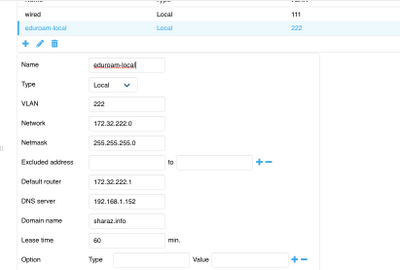
    Screenshot 2020-04-24 10.31.54.png


    Screenshot 2020-04-24 10.32.30.png


  • 2.  RE: Enabling additional local dhcp scope

    Posted Apr 24, 2020 07:59 AM

    Have you tried excluding at least the first 10 addresses (including the gateway address) ?


    Do the hosts see anything as far as a DHCP offer when capturing network traffic on the hosts wireless interface?


  • 3.  RE: Enabling additional local dhcp scope

    Posted May 02, 2020 03:49 AM

    o.k. so found snother thread here that said I had to tag vlans to every ap in the cluster .... and it worked. Created a local scope using vlan 2222 and IP address space 172.31.222.0 excluding bottom 15 addresses  and it worked!


    Can roam from 1 ap to another and stil have same ip address assigned from the above local scope.


    Has brought another issue up.... occasionally client just  cannot be assigned an ip address . You can see all the SSIDs, you can auth correctly you just don;tget an ip address ..... then suddenly it works and youre fine. That conecting to ssids that use either the default scope or the above created one  This is with 8.6.0.4


    A


  • 4.  RE: Enabling additional local dhcp scope

    Posted May 02, 2020 04:16 AM

    Hi Alexsuoy,


    In your original request, you said you were moving to a centralized DHCP server right?


    How is your setup? Can you just map your SSID to a vlan and make this vlan network assigned and you specify the vlan number.. This vlan will be tagged on all your switch ports where the APs are connected. On your layer 3 device (outside the IAP), you configure a helper address pointing to your DHCP server..