Thanks Herman. We're on 10.8.1.2 too, so firmware isn't the difference, and you were right about the license.
Good news: a brand-new WLAN and Central NAC auth profile cache correctly, with the same AP, firmware, Foundation license and phone. The original profile still fails on the same MAC, tested a couple of minutes apart. I copied the original's settings onto the new profile one at a time and it kept working, so it looks like something in the older objects rather than a setting. I can't say exactly what.
Thank you for all your help, especially for testing on your own setup. Your working config is what made me try a clean rebuild.
Original Message:
Sent: Nov 02, 2026 06:59 AM
From: HR-abaef5
Subject: New Central / Central NAC guest MAC caching not working - MAC auth rejected after portal login
My AP is on 10.8.1.2 and I've advanced licenses (but that should not be needed).
------------------------------
Herman Robers
------------------------
If you have urgent issues, always contact your HPE Aruba Networking partner, distributor, or Aruba TAC Support. Check https://www.arubanetworks.com/support-services/contact-support/ for how to contact HPE Aruba Networking TAC. Any opinions expressed here are solely my own and not necessarily that of Hewlett Packard Enterprise or HPE Aruba Networking.
In case your problem is solved, please invest the time to post a follow-up with the information on how you solved it. Others can benefit from that.
------------------------------
Original Message:
Sent: Oct 30, 2026 12:45 PM
From: BP-84447a
Subject: New Central / Central NAC guest MAC caching not working - MAC auth rejected after portal login
Thank you for testing that, I really appreciate you going out of your way to try it on Open. That's a big help, because it rules out the security type, so I'll skip the PSK test I mentioned.
Your Enhanced Open profile now matches ours on everything I can see that relates to caching, including auth-server-group sys_central_nac, mac-authentication and max-authentication-failures 0. So it doesn't look like an SSID config problem on our side.
On your thought about the MAC request going to another auth server: we do have local ClearPass on other SSIDs too, but it doesn't look like that from the AP. The auth trace shows the mac-auth-fail coming from sys_central_nac, and the RADIUS statistics show the guest SSID using only that server, with a matching reject count. Still, your instinct may be right on the cloud side, because those rejects never show up in Central NAC's logs, while the portal logins do. It's as if something other than the normal policy path is answering the MAC auth.
Next I'll build a brand-new WLAN and a brand-new Central NAC auth profile, in case something is wrong with our existing objects. So far I've only replaced the visitor store and accounts. I also have a session with TAC on Monday, and I'll ask them to look at this from the backend. I'll post whatever we find.
If it's easy to check, could you tell me which AOS version your AP is running and whether it's on a Foundation or Advanced license? That would help me narrow down what's left.
Thanks again, this has been more useful than anything else I've found so far.
Original Message:
Sent: Oct 30, 2026 12:32 PM
From: HR-abaef5
Subject: New Central / Central NAC guest MAC caching not working - MAC auth rejected after portal login
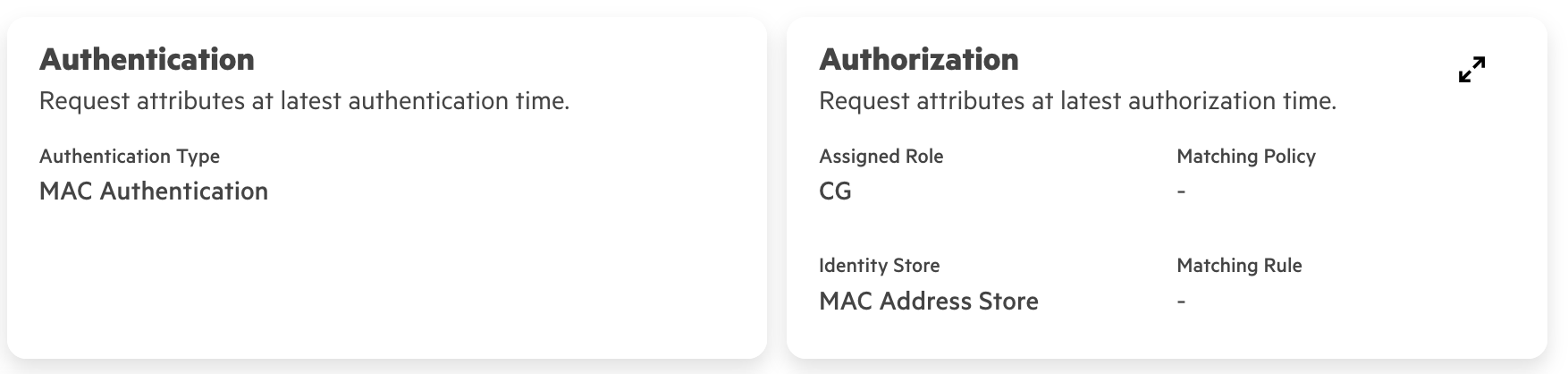
I had not tried with Open, but now I have and it 'just seems to work':
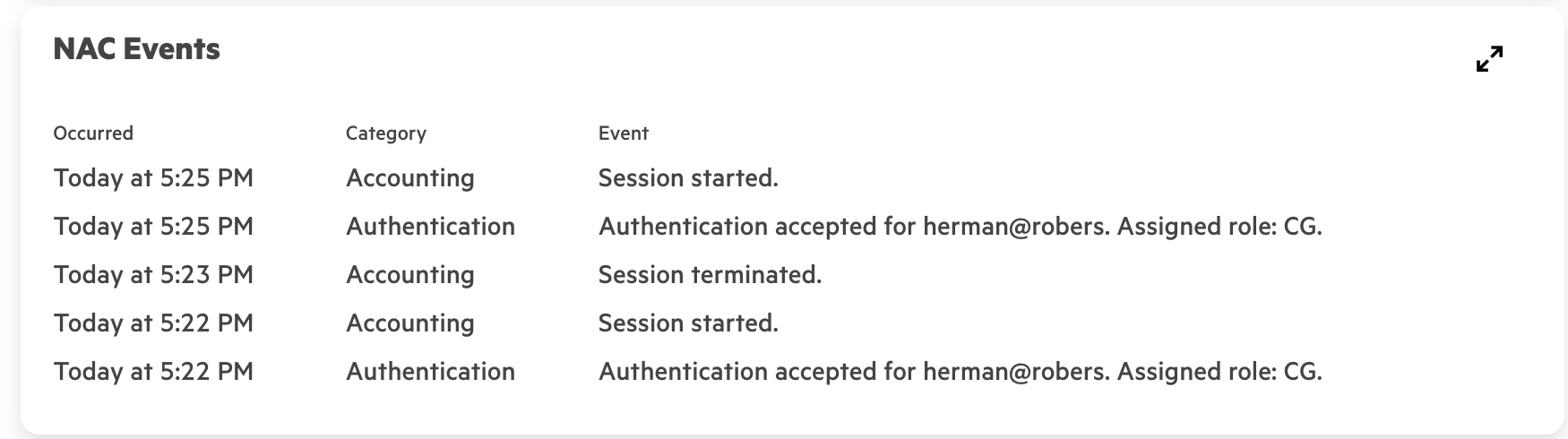
First was Captive Portal; Second MAC Auth:
herman@robers 192.168.15.180 Linux _owetm_CG871155957 NL-AP745-W-46:f6 52+ a-HE CG 41(good) 433(good)wlan ssid-profile CG enable index 7 type guest essid CG utf8 opmode enhanced-open max-authentication-failures 0 vlan 15 auth-server-group sys_central_nac set-role-pre-auth sys_cnac_podx-guest rf-band 5.0 captive-portal external profile sys_cnac_cg mac-authentication dtim-period 1 broadcast-filter arp broadcast-filter-ipv6 unicast-router-advertisements radius-accounting radius-interim-accounting-interval 10 a-basic-rates 12,24 a-tx-rates 12,18,24,36,48,54 g-basic-rates 12,24 g-tx-rates 12,18,24,36,48,54 dmo-channel-utilization-threshold 90 local-probe-req-thresh 0 max-clients-threshold 128 dot11k
It almost feels like the MAC request is going to another authentication server.... But I have local ClearPass servers also configured for other SSIDs, and your Captive Portal authentication does work.... I wonder if TAC can find what's going on here....
EDIT: I have seen in the past some times that if you do change the SSID and Central NAC configuration partially, going back and forth, it may help to unassign and reassign the configuration or reference to the SSID from Central NAC to refresh everything.
------------------------------
Herman Robers
------------------------
If you have urgent issues, always contact your HPE Aruba Networking partner, distributor, or Aruba TAC Support. Check https://www.arubanetworks.com/support-services/contact-support/ for how to contact HPE Aruba Networking TAC. Any opinions expressed here are solely my own and not necessarily that of Hewlett Packard Enterprise or HPE Aruba Networking.
In case your problem is solved, please invest the time to post a follow-up with the information on how you solved it. Others can benefit from that.
------------------------------
Original Message:
Sent: Oct 30, 2026 09:03 AM
From: BP-84447a
Subject: New Central / Central NAC guest MAC caching not working - MAC auth rejected after portal login
Herman, thank you so much for sharing this. Seeing the actual AP config from a working setup is exactly what I needed, and I really appreciate you taking the time to post it.
I compared it line by line with ours, and it helped a lot. mac-authentication is there on our side, and type guest, max-authentication-failures 0, RADIUS accounting and the 10-minute interim interval all match. It also answered something I'd been stuck on: your profile has no mac-authentication-delimiter or mac-authentication-upper-case lines, and neither does ours, so the MAC format I'd been suspicious of probably isn't the problem. That alone saves me from chasing the wrong thing.
The only real difference left is the security type: wpa3-sae-aes on yours and Enhanced Open on ours. I'm going to build a temporary WPA3-Personal SSID with a Central NAC portal to test that, and I'll post the result here either way.
If you don't mind two quick questions: what AOS version is your AP running, and have you ever tried MAC caching on an open or Enhanced Open SSID? No worries if not, you've already been a huge help.
Thanks again, Herman. It's much appreciated.
Original Message:
Sent: Oct 30, 2026 06:14 AM
From: HR-abaef5
Subject: New Central / Central NAC guest MAC caching not working - MAC auth rejected after portal login
It may be useful to have a look at the actual configuration that is on the AP (from SSH/console/Central Troubleshooting show configuration); escpecially if the mac-authentication statement is there:
wlan ssid-profile CG
enable
index 7
type guest
essid CG
utf8
wpa-passphrase stripped
opmode wpa3-sae-aes
max-authentication-failures 0
vlan 15
auth-server sys_central_nac
set-role-pre-auth sys_cnac_podx-guest
rf-band 5.0
captive-portal external profile sys_cnac_cg
mac-authentication
dtim-period 1
broadcast-filter arp
broadcast-filter-ipv6 unicast-router-advertisements
radius-accounting
radius-interim-accounting-interval 10
a-basic-rates 12,24
a-tx-rates 12,18,24,36,48,54
g-basic-rates 12,24
g-tx-rates 12,18,24,36,48,54
dmo-channel-utilization-threshold 90
local-probe-req-thresh 0
max-clients-threshold 128
dot11k
------------------------------
Herman Robers
------------------------
If you have urgent issues, always contact your HPE Aruba Networking partner, distributor, or Aruba TAC Support. Check https://www.arubanetworks.com/support-services/contact-support/ for how to contact HPE Aruba Networking TAC. Any opinions expressed here are solely my own and not necessarily that of Hewlett Packard Enterprise or HPE Aruba Networking.
In case your problem is solved, please invest the time to post a follow-up with the information on how you solved it. Others can benefit from that.
------------------------------
Original Message:
Sent: Oct 29, 2026 08:35 AM
From: BP-84447a
Subject: New Central / Central NAC guest MAC caching not working - MAC auth rejected after portal login
Thanks for posting your config, Herman, that's really helpful. I've compared it with ours and almost everything matches: bridged, AP-only, default role not overridden, Advanced off, a visitor store with "sign in with an account", and MAC caching on with a 30-day limit.
The main difference is security. Yours is WPA3-Personal, and ours is an open guest SSID using Enhanced Open (OWE) in transition mode. We've also left the post-authentication page override off, though I doubt that matters.
I'll set up a temporary WPA3-Personal test SSID with the same Central NAC profile settings and report back on whether caching holds. If it works on PSK but not on open/OWE, that should narrow things down a lot. I'm also asking TAC whether the open/OWE path handles the cached MAC-auth differently.
Thanks again, I'll update this thread once I've tested.
Original Message:
Sent: Oct 29, 2026 04:48 AM
From: HR-abaef5
Subject: New Central / Central NAC guest MAC caching not working - MAC auth rejected after portal login
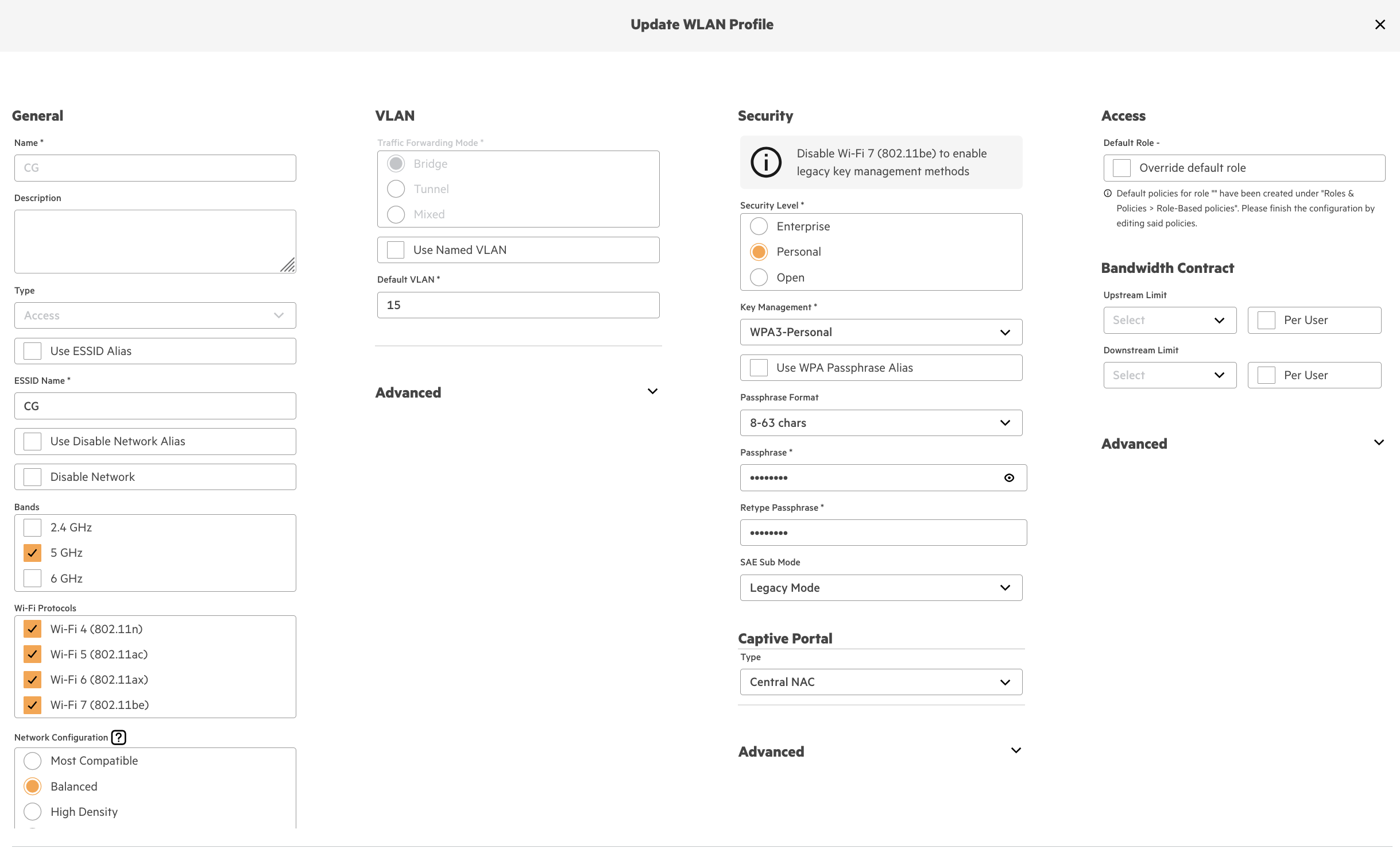
This is my SSID configuration; bridged/AP-only and I have a PSK on the SSID, but that should not make a difference:
Authentication source: 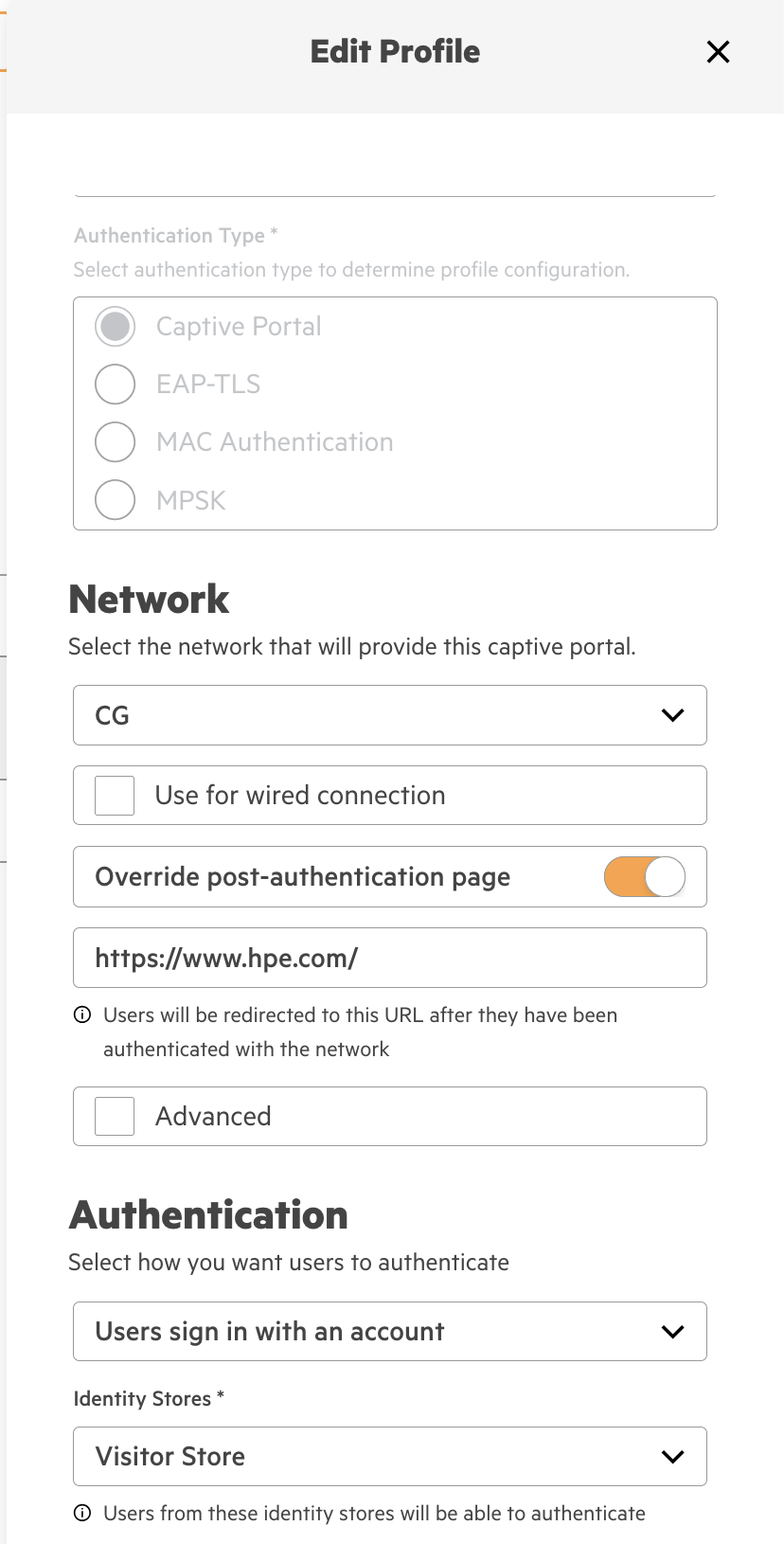
So quite simple...
------------------------------
Herman Robers
------------------------
If you have urgent issues, always contact your HPE Aruba Networking partner, distributor, or Aruba TAC Support. Check https://www.arubanetworks.com/support-services/contact-support/ for how to contact HPE Aruba Networking TAC. Any opinions expressed here are solely my own and not necessarily that of Hewlett Packard Enterprise or HPE Aruba Networking.
In case your problem is solved, please invest the time to post a follow-up with the information on how you solved it. Others can benefit from that.
------------------------------
Original Message:
Sent: Oct 28, 2026 09:39 AM
From: BP-84447a
Subject: New Central / Central NAC guest MAC caching not working - MAC auth rejected after portal login
Thanks Herman. I changed the session time limit to 30 days so it matches your screenshot exactly, then did a fresh portal login and a Wi-Fi off/on about 2.5 minutes later. Same result: mac-auth-req to sys_central_nac and mac-auth-fail 72ms later, portal comes back.
So with identical Default Policy settings, yours works and mine doesn't, which makes me think the difference is somewhere else. Could you share a bit about your setup?
- AP only (no gateway), bridged, AOS-10? Ours are AP-635s on 10.8.1.2, Foundation licenses.
- Visitor store with pre-registered accounts, or self-registration? I've tried both.
- On a reconnect, does your AP auth trace show mac-auth-success?
Also, is there anywhere in New Central I can see whether a MAC actually got cached after the portal login? The rejects don't show up in the Central NAC logs at all, and the portal logins show a blank assigned role.
Original Message:
Sent: Oct 28, 2026 09:23 AM
From: HR-abaef5
Subject: New Central / Central NAC guest MAC caching not working - MAC auth rejected after portal login
I checked and it works for me. One thing that seems to be required for me is a session limit (time) to make MAC Caching work:
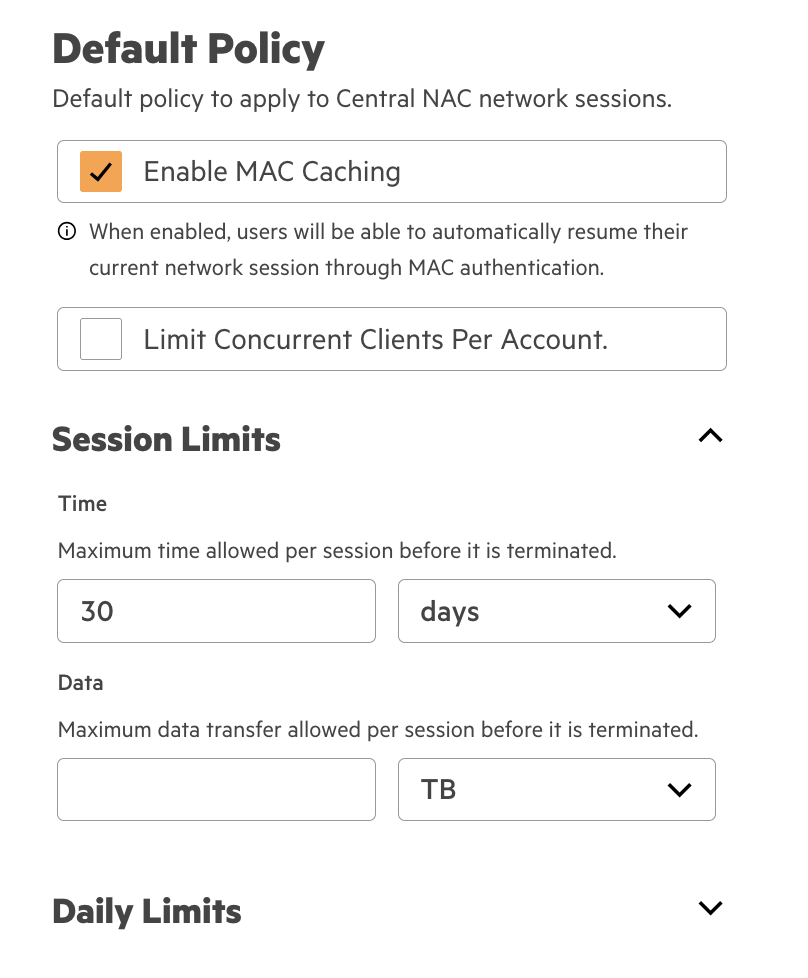
Can you check if you have set that?
Note that modern clients may rotate their MAC addresses, maybe even every day; which makes MAC caching harder to use. But for 1 day/roaming it should be okay in most cases.
------------------------------
Herman Robers
------------------------
If you have urgent issues, always contact your HPE Aruba Networking partner, distributor, or Aruba TAC Support. Check https://www.arubanetworks.com/support-services/contact-support/ for how to contact HPE Aruba Networking TAC. Any opinions expressed here are solely my own and not necessarily that of Hewlett Packard Enterprise or HPE Aruba Networking.
In case your problem is solved, please invest the time to post a follow-up with the information on how you solved it. Others can benefit from that.
------------------------------