I am not sure, perhaps TAC would be in a position to advise.
If my post was useful accept solution and/or give kudos.
Any opinions expressed here are solely my own and not necessarily that of HPE or Aruba.
Original Message:
Sent: Oct 21, 2026 09:44 PM
From: DB86
Subject: New Central Port profiles not allowing LAG Configuration
Thanks! That's good to know, and it means I read too much into the wording haha. The DIA text isn't New Central refusing a LAG profile on AOS-S, it's a generic validation warning, so a re-sync is the first thing to try before rebuilding ports by hand. The New Central Force Re-sync at the Device level page notes a device can stay out of sync when a push was in progress and the device went offline, which fits the trunk dropping mid-change here. I assume...lol
AP-e172d8, one thing is still open from the OP's last post. Edits to the UPLINK port profile never reach their AOS-S switches unless the profile is removed and re-applied. Is that a known early access gap for AOS-S in New Central, or one for TAC?
------------------------------
Dustin Burns
@Worldcom Exchange, Inc.
www.wei.com
- - -
The comments I post here are my own, and not my employers
If my post was useful accept solution and/or give kudos
Personal Blog: www.networkfieldnotes.com
- - -
------------------------------
Original Message:
Sent: Oct 21, 2026 06:01 PM
From: AP-e172d8
Subject: New Central Port profiles not allowing LAG Configuration
that warning message about DIA is a generic validation message that will be reworded and has nothing to SD-branch, etc.
generally a re-sync will resolve that warning.
------------------------------
If my post was useful accept solution and/or give kudos.
Any opinions expressed here are solely my own and not necessarily that of HPE or Aruba.
------------------------------
Original Message:
Sent: Oct 21, 2026 02:03 AM
From: DS-FkB358
Subject: New Central Port profiles not allowing LAG Configuration
Thanks, that helped, after manually resetting one port at a time (and manually setting the management VLAN so it doesnt lose connection while i edit the other one) and then manually trunking, the switch and central seems to be happy now after the switch wrote "Restore not performed as running-config and config REST_Payload are identical" in its log.
What i have noticed though, when updating the uplink port profile, it never updates on AOS Switches, the only way to "update" it there is to delete and reapply the port profile with the same method.
Original Message:
Sent: Oct 20, 2026 04:38 PM
From: DB86
Subject: New Central Port profiles not allowing LAG Configuration
Scratch my CX read. On a 2540 this isn't leftover config, it's the platform. That message is the port profile engine refusing to expand a LAG enabled profile onto an AOS-S switch, so deleting the old trunk again won't get you past it.
Build the trunk the other way round. Unbind UPLINK from 51 and 52, then create the LAG at the device in the Switch Interface Configuration profile with 51 and 52 as members, LACP or static to match the core. That profile is where New Central keeps LAG for both CX and AOS-S: https://arubanetworking.hpe.com/techdocs/hpe-central/content/get-started-with-hpe-aruba-networking-central/switch-interface-configuration-profile.html Keep port profiles for VLAN and port settings only on those two.
AOS-S config in New Central is still early access per the AOS-S Switch Configuration page: https://arubanetworking.hpe.com/techdocs/hpe-central/content/wired-switching/aos-s-switch-configuration.html 16.11.0030 is inside the supported range, so firmware isn't it. I haven't pushed a LAG to a 2540 from New Central myself, so if the Switch Interface Configuration profile refuses it too, that exact message is one for TAC.
------------------------------
Dustin Burns
@Worldcom Exchange, Inc.
www.wei.com
- - -
The comments I post here are my own, and not my employers
If my post was useful accept solution and/or give kudos
Personal Blog: www.networkfieldnotes.com
- - -
------------------------------
Original Message:
Sent: Oct 20, 2026 01:36 AM
From: DS-gvU358
Subject: New Central Port profiles not allowing LAG Configuration
(this account and the poster are the same Person, just to avoid confusion)
This isn't a CX Switch, but an AOS-S 2540 running version 16.11.0030. (Interface 51 with switch port profile UPLINK has LAG configuration. LAG profile expansion is not supported in DIA.) We dont even use any Gateways or SD-WAN in our current Setup.
The LAG was already deleted from central and Switch CLI before making the original Post too, but Central still stops my from syncing the Configuration.
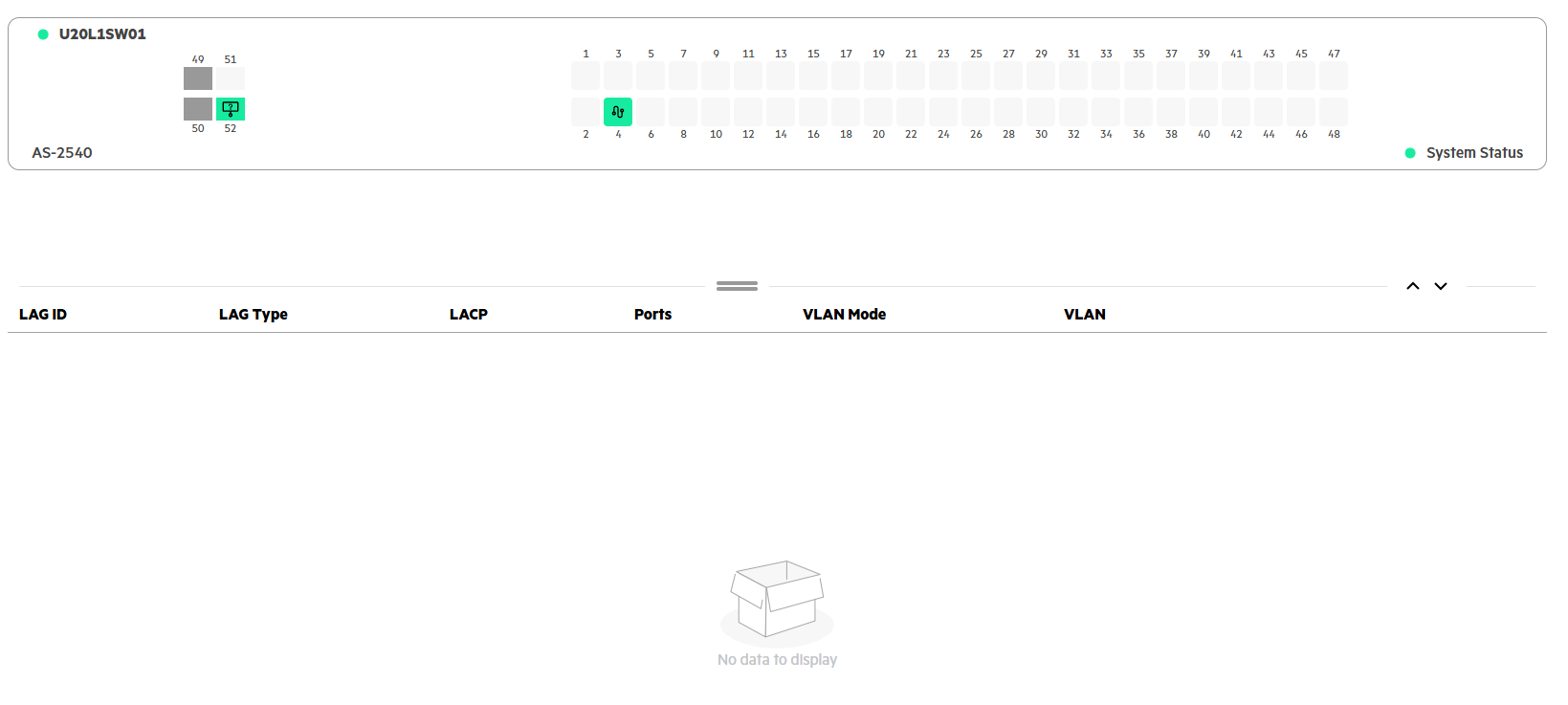
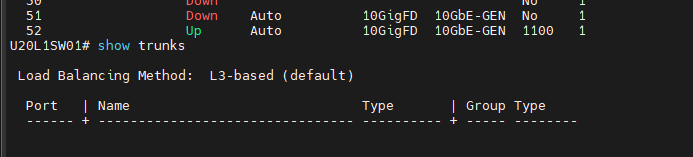
Port 51 and 52 are the ones i want to trunk. the previous LAG was on the same Ports.
Original Message:
Sent: Oct 19, 2026 09:30 PM
From: DB86
Subject: New Central Port profiles not allowing LAG Configuration
DIA is Direct Internet Access, a gateway/SD-Branch term for a WAN uplink that breaks out locally instead of tunnelling to the hub. I have never seen it surface in a switch port-profile check, so paste the exact message text and your CX version. My guess is the profile's uplink role is tripping a gateway-side validation in the shared port-profile code, but the rule it is most likely enforcing underneath is documented: a LAG-enabled port profile can't be applied to an Ethernet interface that's already a member of a LAG created at the device scope, and it also fails if that profile's LAG ID already exists on the switch. Your uplink is exactly that case. The old trunk LAG is still on the box even though you hand-reconfigured one member from the console.
The order matters so delete the device-level LAG first (Switch Interface Configuration, LAGs tab, or no interface lagN on the console) so neither the member ports nor the LAG ID are claimed, then assign the LAG port profile to both uplink ports. Keep the console session open for it. The New Central Configuring LAG page lists those rules: https://arubanetworking.hpe.com/techdocs/CNX-CNXOP-NewHelp/HPE%20Aruba%20Networking%20Central/GUID-649A9ED3-E389-41D6-BEFD-9F8BF0654A35.html
One thing I've tested on a 6200F at 10.16 under New Central: a push that cuts the switch off rolls back on its own after about 12 minutes and the device shows Out of Sync with a rolled-back push, so if the uplink flips mid-apply, wait for that before touching anything else.
------------------------------
Dustin Burns
@Worldcom Exchange, Inc.
www.wei.com
- - -
The comments I post here are my own, and not my employers
If my post was useful accept solution and/or give kudos
Personal Blog: www.networkfieldnotes.com
- - -
------------------------------